


Stock Scanner - Market Mover
3.143.00 Reviews
App Specs
- Version
- 8.1
- Updated On
- License
- Free
- Downloads
- 50,000+
- Developer
- Stock Screener APP
- Categories
- Finance
- Platform
- Android
Screenshots
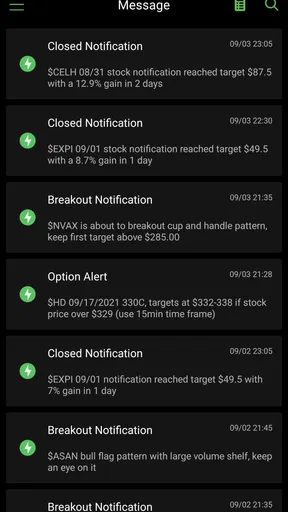
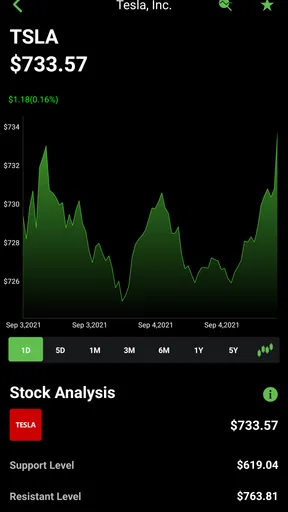
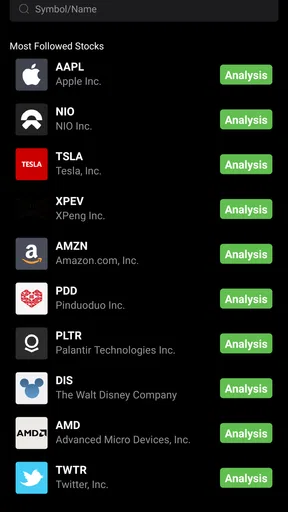
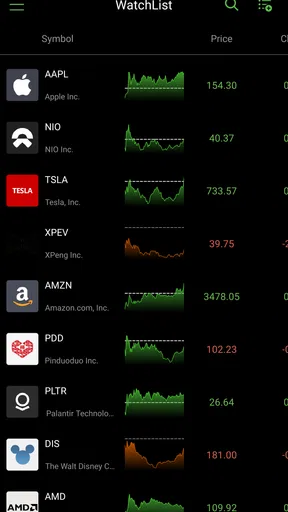
 Analysis by AppCompare
I approached Stock Scanner - Market Mover as a practical finance app rather than a complete investing platform. Its purpose is to help me watch market activity, follow stock news, notice large-money movements, and scan for shares that match a particular market idea. That makes it most useful during the research stage, when I want to narrow a long list of companies before opening a more detailed brokerage or charting tool.
The first thing I would tell a new user is to keep expectations realistic. This is not the kind of app I would use as my only source for a buy or sell decision. I see it as a market-watching companion: a place to spot something worth investigating, organize a watchlist, and return to developing stories without constantly searching from scratch. Used that way, it can save time. Used as an automatic decision-maker, it becomes much less convincing.
The app is free to install, with optional in-app purchases ranging from $9.99 to $349.99 per item. It is aimed at Everyone, runs on Android 8.0 or later, and is developed by Stock Screener APP. The current version is 8.1, and the app has passed the fifty-thousand-install mark. Those details make it accessible to someone who wants to try a stock scanner without committing money immediately, although I would still pay close attention to what any optional purchase unlocks before accepting it.
Getting oriented before the first search
When I open a market scanner for the first time, I do not begin by looking for a dramatic winner. I first try to understand what the app considers important: price movement, unusual activity, news, or signs that larger investors are active. That small pause matters because a scanner can present many signals at once, and a beginner may mistake visibility for importance.
My suggested starting point is simple. Look for the area that brings together stock discovery and market movement, then choose one familiar company or one broad market theme. The aim is not to build a portfolio in the first session. It is to learn how the app presents a result and whether the information helps you ask better questions.
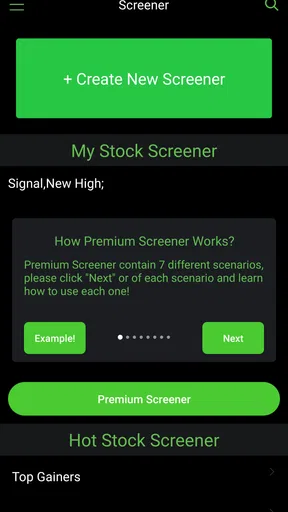
The store short description calls it a stock scanner, while the longer summary points toward market tracking, large-money moves, stock news, and scanning tools. In practical terms, I would treat those as four connected ways to investigate an idea. A movement may lead me to a company; a news item may explain why it is moving; a scanner may reveal similar names; and a watchlist can help me follow the situation later.
That workflow is more useful than opening random symbols one by one. It also gives a first-time user a clear definition of success: find one relevant stock, understand why it appeared, and decide whether it deserves further research elsewhere.
Worth Reading Before You Choose

EA SPORTS FC Mobile 26 Is a Bigger Football Game, but It Takes Time

Flipboard Shows What News Apps Must Do Beyond the Feed

Switching to Android Auto Means Rethinking Your Driving Routine

Google Calendar Makes a Crowded Week Easier to Manage

Ludo King Makes the Most of the Minutes Between Plans

Baby Panda World Brings Quick Play to Modern Phones, but Its Game Library Feels Busy
Setting up a useful routine
I would not try to customize everything immediately. Start with a small group of companies you already recognize, preferably from different industries. This makes it easier to compare how the app handles quiet trading, major news, and sudden movement. If you begin with obscure names only because they appear active, you may not know whether the result is genuinely interesting or simply unfamiliar.
A good first routine is to check the market scanner at a consistent time, note which names attract attention, and then revisit those names after reading the related news. The important habit is separating discovery from judgment. The scanner can tell me where to look; it cannot replace the work of checking the company, the broader market, and the reason behind a move.
I also recommend keeping a short written note outside the app. Record why a stock caught your attention, what news seemed relevant, and what would make you stop following it. This is a surprisingly useful safeguard against chasing whatever looks exciting at the moment. The app becomes much more valuable when it supports a repeatable process instead of feeding constant impulse.
Finding the first meaningful result
For a first successful action, I would choose one stock from a scanner result and investigate it from three angles. First, look at the movement that brought it to your attention. Second, read the associated news and ask whether the timing makes sense. Third, compare the stock with another name in the same general area rather than viewing it in isolation.
This three-step check is one of the best ways to avoid a common beginner mistake: assuming that a large move automatically means a strong opportunity. A stock can move because of uncertainty, a temporary announcement, a broader market reaction, or a change in expectations. The app can help surface the event, but context determines whether it matters to your own plan.
Once I find a company worth monitoring, I would add it to a focused watchlist if that option is available in the workflow I am using, then leave the app and verify the details through a trusted financial source. I prefer this approach to filling the watchlist with dozens of symbols. A smaller list makes later alerts, news checks, and comparisons easier to interpret.
Another useful technique is to use the scanner as a question generator. Instead of asking, “What should I buy?” I ask, “Why is this appearing now?”, “Is the movement part of a wider sector trend?”, and “What information would prove my first impression wrong?” That change in wording turns the app from a prediction machine into a research tool, which is a much safer role for it.
How the main tools fit together
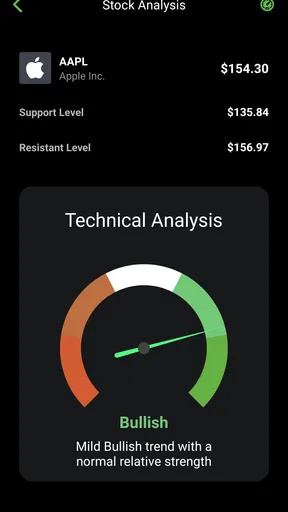
The market-tracking side is helpful when I want a quick sense of what deserves attention. I use it as a dashboard rather than a detailed trading terminal. A dashboard is good at directing my eyes; it is not always the best place for deep valuation work, long historical comparisons, or order execution.
The large-money movement angle is potentially useful for finding unusual activity that might otherwise escape a casual investor. However, I would be careful with the phrase “big money.” Large transactions or institutional-looking activity do not automatically reveal the investor’s intention, time horizon, or risk management. Treat the signal as evidence that something happened, not proof that a profitable move is about to follow.
The news-tracking element can shorten the distance between a price change and its possible explanation. I like that connection because it encourages me to investigate rather than stare at a number. Still, headlines can be incomplete or emotionally written, so I would read beyond the first line and check whether the story is new, already widely known, or unrelated to the specific price action.
The scanner itself is where the app is likely to feel most useful to active researchers. A scanner can reduce the number of companies I need to inspect manually, especially when I have a clear condition in mind. The trade-off is that every filter narrows the view. A stock that fails a chosen screen is not necessarily poor; it may simply not match that particular method.
Where beginners may get confused
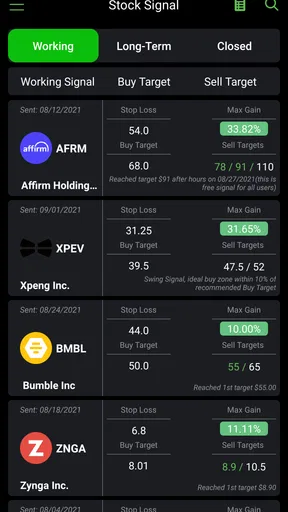
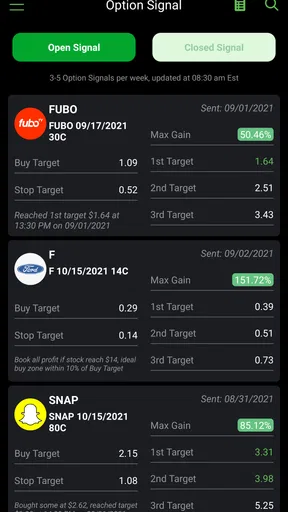
The biggest source of confusion is the difference between a signal and a recommendation. A highlighted mover, an unusual flow, or a fresh news item can feel like an instruction, especially when several signals point in the same direction. I would resist that feeling. The app helps identify candidates, but a candidate still needs independent research and a risk decision.
Another difficulty is timing. Market information changes quickly, and a result that looks important when first seen may be less useful after the market has reacted. For that reason, I would record when I noticed a signal and avoid treating an old result as if it were live. If I am making a decision involving real money, I would confirm current information through a separate source before acting.
New users may also wonder whether the free version is enough. For basic exploration, the free entry point makes sense: install the app, learn the layout, test the scanner, and decide whether the workflow fits. Optional purchases can become relevant for people who need more depth or fewer restrictions, but I would not buy anything until I had identified a specific problem I am trying to solve. Paying for more market information does not automatically improve the quality of the questions being asked.
The rating is around 3.1 from roughly two hundred ratings, with a little over forty written reviews. I read that as a reason to test the app personally rather than assume it will suit everyone. A finance app can be useful to one person and frustrating to another depending on preferred filters, update habits, and expectations about professional-grade tools.
There is also a practical distinction between this app and a brokerage application. A broker is built around accounts, orders, balances, and execution. Stock Scanner - Market Mover is better approached as a discovery and monitoring layer. If my main goal is to place trades, manage a portfolio, or review tax information, I would use my broker or a dedicated portfolio tool instead. If my problem is finding market ideas to investigate, this app is closer to the right category.
Compared with a general finance news app, its advantage is the scanner-oriented approach. A news app may be better for broad economic coverage and detailed articles, while this app is more focused on turning market movement into a list of names to examine. Compared with a professional charting service, it is likely to feel lighter and more approachable, but less suitable for advanced technical analysis or a highly customized trading desk.
A realistic everyday example
Imagine I have ten minutes before work and want to see whether anything deserves attention. I open the app and start with the market activity rather than a random search. One company appears alongside an unusual movement and a related news item. I save the name, read the story, and compare it with another company exposed to the same theme.
I then write down three things: what changed, what supposedly caused it, and what I still do not know. At lunch, I check whether the story developed or whether the move faded. In the evening, I use a separate source to review the company’s financial background before deciding whether it belongs on a longer-term watchlist. The app has done its job if it helped me find and organize the question. It has not failed because it did not make the decision for me.
This workflow also shows when the app is not a good fit. If I only invest occasionally and prefer carefully prepared research reports, a scanner may create unnecessary noise. If I need instant execution, advanced chart studies, or portfolio accounting, I would choose a specialist tool. If I am tempted to trade every highlighted mover, I would step back before using any market scanner regularly.
Making the next step more disciplined
After the first successful search, I would create a simple personal rule: never act on a scanner result until I can explain the reason for the movement in my own words. That rule sounds basic, but it prevents a common error in fast-moving markets. It also makes the news feature more valuable because I am reading for understanding rather than confirmation.
I would then divide watchlist entries into two groups: companies I already understand and companies I am researching. This prevents unfamiliar names from blending into established ideas. For the research group, add a short note about the trigger and a date for review. The app can provide the market trail, while the note preserves my original reasoning.
Another advanced but practical use is comparing a scanner result with what it did not show. If one company is moving sharply but similar companies are quiet, the event may be company-specific. If several related names move together, the cause may be sector-wide or market-wide. That distinction changes the questions I ask next and helps prevent overreacting to a single symbol.
I also prefer to use news as a confirmation step after noticing movement, not as a stream to consume endlessly. Constant headline checking can make every fluctuation feel urgent. A deliberate sequence—scan, investigate, compare, then wait—keeps the app useful without allowing it to dictate my attention.
Because the app is free to start, I would give it a short trial based on actual tasks rather than time alone. Can I find a relevant stock faster than I can through my usual method? Do the scanner results lead to understandable explanations? Can I return to the names I care about without rebuilding the search each time? Those answers matter more than the number of available screens.
My recommendation for the right kind of user
I would recommend Stock Scanner - Market Mover to a beginner who wants a guided way to discover stocks and follow market stories, provided that person understands the difference between research and execution. It can also suit an experienced investor who wants a lightweight source of ideas before moving into a broker, charting platform, or company research service.
I would be more cautious about recommending it to someone who expects guaranteed signals, complete investment analysis, or a replacement for a brokerage account. The app’s strongest role is helping me decide where to look next. Its weakest role would be carrying the entire investment process from discovery to action without outside verification.
The free starting point lowers the risk of trying it, while the optional purchases mean I would evaluate the basic workflow before spending anything. I would also remember that the app is rated Everyone, but that age label says nothing about the financial risk of acting on market information. A young or inexperienced user still needs a sensible adult-level approach to money, uncertainty, and loss.
My final view is positive but measured. This is a focused finance app for scanning, tracking, and connecting market movement with news. It is most effective when I use it as the first step in a research routine, not the final authority. If you want a quick way to turn a broad market into a manageable list of questions, it is worth trying. If you want execution, deep analysis, or a complete portfolio command center, I would look to a more specialized alternative.
Pros
- Quickly highlights stocks with unusual price or volume activity.
- Useful filters help narrow market movers to relevant opportunities.
- Clean interface makes scanning results easy to review.
- Can support faster pre-market and intraday research.
- Helpful for discovering lesser-known stocks gaining momentum.
Cons
- Some advanced features may require a paid subscription.
- Market data can be delayed depending on the selected exchange.
- Alerts may require manual setup and careful notification management.
- Scanner results still need independent research before trading.
- Coverage and tools may vary between U.S. and international markets.
FAQs for Stock Scanner - Market Mover
What is Stock Scanner - Market Mover used for?
Stock Scanner - Market Mover is designed to help investors find shares that are attracting attention in the market. It can be useful for reviewing price movements, identifying potential gainers and losers, checking trading activity, and monitoring stocks that may be experiencing unusual momentum. The app is best treated as a research and screening tool rather than a complete replacement for professional financial analysis or investment advice.
Does Stock Scanner - Market Mover provide real-time stock prices?
The availability and speed of market data may depend on the specific exchange, region, data provider, and app configuration. Some information may be delayed, especially for certain markets, while other features may update more frequently. Before relying on a displayed price to make a trade, users should compare the information with their broker or an official exchange source and check whether the app clearly identifies delayed or real-time data.
Can I use Stock Scanner - Market Mover to buy or sell stocks?
Stock Scanner - Market Mover is primarily intended for discovering and monitoring market opportunities, not necessarily for executing trades directly. Even if the app includes links or integrations related to brokers, users should confirm whether trading is actually supported in their country and account type. Orders normally need to be placed through a regulated brokerage platform, where fees, execution conditions, and account requirements are clearly shown.
Is Stock Scanner - Market Mover suitable for beginners?
Beginners may find the app helpful because scanners and market-mover lists can make it easier to see which stocks are changing significantly. However, understanding the results still requires basic knowledge of price action, volume, volatility, news, and risk management. A stock appearing near the top of a list is not automatically a good investment, so new users should learn the terminology and practice researching companies before investing real money.
Is Stock Scanner - Market Mover free to download and use?
The app may be available to download without an upfront charge, but some features can depend on advertising, in-app purchases, subscriptions, or limits on data and scanning tools. Pricing and included functions can change over time, so users should review the current store listing and subscription details before confirming payment. It is also worth checking cancellation terms and whether a free trial renews automatically.


